|
|
|
|
Insights and perspectives on technology, AI, software development, and industry trends from the TrueSolvers team.
Attackers observing screens to steal passwords, banking details, and sensitive information represent a genuine security threat that costs organizations millions annually. In 2023, one victim lost 70,000 GBP through shoulder surfing at night. The average cost of data breaches reached $4.45 million for companies when employee credentials are compromised, according to industry data.
The threat isn't limited to dramatic theft scenarios. A study found that 72 percent of UK commuters peer over shoulders of fellow passengers. Whether intentional surveillance or casual observation, the exposure creates vulnerability. Attackers use direct observation, smartphone cameras recording screens from a distance, or thermal imaging detecting heat patterns on keypads after PIN entry.
Corporate environments face particular risk. Employees accessing customer databases, financial records, or proprietary information in open offices, coffee shops, or during travel create exposure points. IT departments struggle to enforce privacy policies when physical workspace design makes screens visible to passersby. This context explains why Samsung integrated Privacy Display with Knox enterprise security, enabling mandatory activation policies on public WiFi or within geofenced zones.
The trade-off centers on user experience versus timing. Samsung's electronic approach maintains full brightness and color accuracy while allowing app-specific activation and quick toggling for screen sharing. Physical privacy filters work universally on any phone you own today but reduce screen brightness, limit viewing angles even when you want to share content, and remain always active. Whether electronic control justifies a two-month wait and $1,299 investment depends on your current phone situation, privacy threat level, and tolerance for the limitations of physical filters.
Privacy Display uses pixel-level light control rather than physical filtration. Samsung describes the technology as "privacy at a pixel level," indicating hardware-level implementation rather than software manipulation. The system appeared in One UI 8.5 beta animations showing the display darkening as the phone tilts left or right.
The technology relies on M14 OLED material, which represents a substantial upgrade from the M13 generation used in previous Samsung flagships. M14 OLED offers 20-30 percent increased brightness and efficiency compared to M13. Panel lifespan has been extended by 10-20 percent. This improvement stems from using deuterium in red, green, and blue materials, whereas M13 OLED only incorporated deuterium in green and blue colors.
Samsung confirms the feature has been in engineering development for over five years. This extended timeline aligns with the M14 OLED stack development cycle. The hardware requirement creates a clear boundary: Privacy Display cannot be backdated to existing phones through software updates. It's physically impossible without the M14 panel's specific emission control capabilities.
The S26 Ultra display specifications include:
• 6.9-inch Dynamic AMOLED panel with 120Hz refresh rate • M14 OLED material with Flex Magic Pixel technology • 2,600 nits peak brightness (though M14 can achieve up to 6,000 nits) • QHD+ resolution with next-generation Corning Gorilla Glass Armor
Samsung's decision to constrain brightness to 2,600 nits despite M14's 6,000-nit capability reflects a design philosophy prioritizing power efficiency over maximum visual performance. The 20-30 percent efficiency improvement allows maintaining the same 5,000mAh battery capacity while potentially extending battery life through better power management.
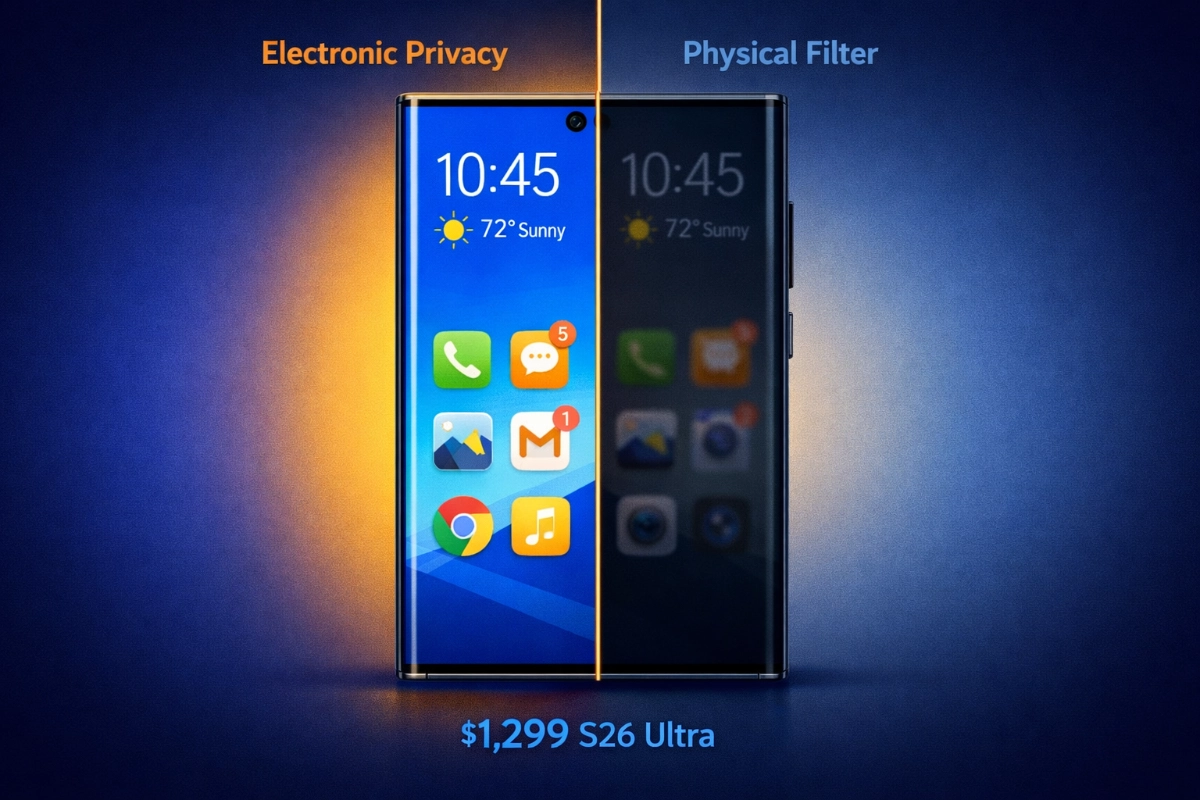
The system controls angular light distribution per pixel, preserving luminance and color accuracy for direct viewing while reducing lateral visibility for bystanders. When activated, the display remains fully visible when viewed head-on but appears almost completely black to side viewers.
Granularity separates this approach from blanket solutions. Users can configure Privacy Display to activate only when specific apps like WhatsApp or banking software are running. Industry analyst renderings demonstrated localized masking capability, protecting sensitive zones like notification banners or two-factor authentication codes without darkening the entire display.
This selective control addresses a fundamental limitation of physical privacy filters: they can't distinguish between wanted and unwanted viewing. When you're trying to show someone a photo or share information on your screen, physical filters force you to angle the phone precisely. If the viewing angle is too steep, even your intended viewer can't see clearly, creating readability challenges similar to how poor text rendering affects article accessibility.
Samsung's electronic solution includes a Quick Settings toggle for instant activation and deactivation. Users can schedule when it operates, potentially enabling it automatically during commute hours or when connected to public WiFi. The system integrates with Samsung Knox, allowing IT departments to enforce policies such as always-on activation in specific apps, mandatory use on public networks, or activation within geofenced areas around sensitive facilities.
The technical implementation controls how light exits the panel at the microcavity level. By tuning emission profiles and precise subpixel driving, the OLED stack influences angular light distribution without the brightness penalties associated with polarizing filters. This preserves the display's full luminance capability for the primary viewer while restricting what off-angle observers can see.
Upon review of the hardware requirement pattern across Samsung's display innovations, the M14 OLED dependency creates a classic early adopter premium. Users pay not just for the privacy feature but for being first to access display technology that will likely cascade to mid-tier devices within 18-24 months. The question becomes whether solving shoulder surfing today justifies accepting physical filter limitations, or whether superior user experience warrants waiting for electronic control.
Physical privacy screen protectors use micro-louver technology, essentially miniature vertical blinds embedded in the filter material. These block light at angles typically beyond 30-60 degrees, making content unreadable from the sides while remaining visible head-on.
The immediate advantages are accessibility and universality. You can buy a privacy filter for $10-60 depending on quality and install it on any current smartphone within minutes. It works across all apps without configuration, provides protection that can't be accidentally disabled, and requires no special hardware or software support.
The compromises are significant. Privacy filters reduce screen brightness by blocking light for everyone, not just side viewers. This necessitates higher brightness settings, which increases battery consumption. The filter remains always active even when privacy isn't needed, limiting your ability to share content naturally. Viewing angles are constrained even for the primary user, requiring you to hold the phone at specific angles for optimal clarity.
Quality varies substantially across manufacturers. Budget filters may introduce color distortion or rainbow effects. Premium options minimize these issues but still impose the fundamental trade-off: constant protection at the cost of viewing flexibility.
Samsung's approach maintains full brightness and color accuracy because it's not physically blocking light for the primary viewer. The system only restricts angular distribution, preserving the display's complete visual capability when viewed straight on.
Selective activation means you can enable privacy for banking apps while leaving it off for browsing, messaging, or media consumption. The Quick Settings toggle allows instant deactivation when you want to share your screen. Scheduled automation can activate privacy during your commute without requiring manual intervention.
The constraint is availability. Samsung announces the S26 series on February 25, with retail availability starting March 11. Pricing remains at $1,299 for the base 256GB model, matching the S25 Ultra launch price. Whether the feature extends beyond the Ultra model to standard S26 or S26 Plus variants remains unconfirmed.
For users who already own recent flagship phones, the decision involves whether electronic privacy control justifies replacing a capable device. The S25 Ultra launched February 7, 2025 at the same $1,299 price point. Someone who bought it six months ago faces a choice: accept physical filter limitations on their current phone, or upgrade to the S26 Ultra for built-in electronic privacy despite owning a recent flagship.
Samsung confirmed these key dates and specifications:
Announcement: February 25, 2026 (Unpacked event)
Retail Launch: March 11, 2026 (Wednesday, avoiding Friday the 13th)
Base Price: $1,299 for 256GB model
Hardware: M14 OLED panel with Flex Magic Pixel technology
Model Availability: Confirmed for S26 Ultra, unconfirmed for other S26 variants
The pricing freeze is notable given earlier warnings from Samsung executives. Co-CEO TM Roh indicated price increases may be "inevitable" while global marketing president Wonjin Lee confirmed Samsung may need to reprice Galaxy S26 models. The concern stems from LPDDR5X RAM costs reportedly set to triple due to AI boom demand, with manufacturers like Micron prioritizing server-grade DDR5 chips over mobile RAM.
Samsung's decision to maintain $1,299 pricing suggests either absorbed cost increases or strategic positioning to prevent competitive disadvantage. For buyers, this means no premium above standard flagship pricing for Privacy Display access.
The two-month wait from early February announcement to March 11 availability creates a decision window. Users experiencing active shoulder surfing threats might find two months unacceptable. Those with lower immediate risk can evaluate whether S26 Ultra's complete feature set, including upgraded cameras, faster charging, and electronic privacy control, justifies waiting versus buying an S25 Ultra now with a physical privacy filter added.
Different user situations create different optimal choices. The decision framework depends on your current device, privacy threat level, and tolerance for physical filter limitations.
Wait for S26 Ultra with Electronic Privacy Display if:
• You don't currently own a flagship phone and planned to upgrade anyway. Privacy Display becomes a bonus feature rather than the sole justification.
• You frequently share your screen with colleagues or friends, making physical filter viewing angle restrictions frustrating in daily use.
• You work in corporate environments with Knox deployment and IT-enforced security policies. The enterprise integration provides compliance value beyond individual privacy.
• You regularly handle genuinely sensitive information (financial data, medical records, legal documents) in public spaces and need reliable protection without workflow disruption.
• You can wait until March 11 without significant privacy risk during the interim period.
Buy current phone with physical privacy filter if:
• You're experiencing active shoulder surfing threats and need protection immediately, not in two months.
• You own a capable current phone (S25 Ultra, S24 Ultra, or equivalent) and can't justify replacing it primarily for privacy features.
• Your privacy needs are specific to certain situations (commuting, coffee shops) where filter limitations are acceptable trade-offs.
• You want to test whether privacy protection actually changes your behavior before committing to a $1,299 device purchase.
• Budget constraints make $1,299 unrealistic, but $15-40 for a physical filter is manageable.
From our findings of the launch timing and hardware exclusivity, Samsung has created a scenario where the right choice depends heavily on timing. Someone buying in early February faces a different calculus than someone buying in April after S26 Ultra availability. The physical filter serves as a bridge solution, providing immediate protection while you evaluate whether electronic control justifies future upgrade costs.
For users without current flagships, the comparison becomes S25 Ultra at $1,299 with physical filter add-on versus waiting for S26 Ultra at the same price with built-in electronic privacy. The S26 Ultra adds electronic privacy control, improved charging (60W wired versus 45W, 25W wireless versus 15W), and camera upgrades (12MP 3x telephoto versus 10MP, wider apertures on main and 5x periscope). Whether those improvements justify a two-month wait depends on how urgently you need a new phone.
Yes. Physical privacy filters are hardware-agnostic screen protectors that work on any smartphone regardless of built-in privacy features. You can apply a physical filter to the S26 Ultra's display if you want always-on protection without relying on electronic activation. However, combining both approaches may be redundant. The electronic Privacy Display provides similar angular restriction when activated, so adding a physical filter primarily makes sense if you want guaranteed protection that can't be accidentally disabled or if you need privacy in situations where you might forget to activate the electronic feature.
The potential downside is compounding brightness reduction. Physical filters inherently reduce luminance by blocking light. While the S26 Ultra's electronic system maintains full brightness for head-on viewing, adding a physical filter on top would reintroduce the brightness penalty across all viewing angles. This effectively negates one of the electronic system's primary advantages.
Yes. Samsung confirmed that Privacy Display integrates with Knox enterprise security, enabling IT departments to enforce privacy policies programmatically. Administrators can configure mandatory activation on public WiFi networks, require always-on mode in specific apps designated as containing sensitive information, or trigger activation within geofenced zones around secure facilities or client offices.
This enterprise integration addresses a common corporate security challenge: enforcing privacy policies when employees work in varied environments. Rather than relying on individual compliance, IT can ensure privacy protection activates automatically based on network conditions or location. The feature appears in the Display section of Settings with a Quick Settings toggle for manual control, but enterprise policies can override user preferences when corporate security requirements demand it.
Organizations deploying Samsung devices through Knox Mobile Enrollment can include Privacy Display configuration in their device provisioning profiles, ensuring protection is active from initial device setup.
Samsung hasn't officially confirmed whether Privacy Display is exclusive to the S26 Ultra or will appear in standard S26 and S26 Plus models. The Ultra serves as Samsung's flagship platform for introducing advanced display technologies before broader rollout. Given that Privacy Display requires M14 OLED hardware with Flex Magic Pixel technology, the limitation likely stems from display supply chain economics rather than deliberate feature segmentation.
M14 OLED panels represent Samsung Display's most advanced mobile OLED technology, debuting in other manufacturers' devices before appearing in Samsung's own phones. The Ultra model's larger display size and premium positioning justify the higher component costs associated with cutting-edge OLED materials.
If Samsung extends Privacy Display to other S26 models, it would require equipping them with M14 OLED panels as well. The decision depends on supply availability, cost structure, and market positioning strategy. Ultra exclusivity creates differentiation, while broader availability increases the feature's impact on shoulder surfing reduction across Samsung's user base.
Privacy Display controls angular light distribution without reducing brightness for head-on viewing. Samsung's implementation maintains the S26 Ultra's full 2,600-nit peak brightness capability when you're looking directly at the screen, unlike physical privacy filters which reduce luminance for all viewers including the primary user.
The battery life impact depends on usage patterns. Activating Privacy Display involves additional pixel-level processing to control emission angles, which theoretically increases power consumption compared to standard display mode. However, Samsung designed the feature specifically for M14 OLED's improved efficiency characteristics. The M14 material offers 20-30 percent better efficiency than the previous M13 generation.
In practice, the battery impact likely remains negligible because you're not using Privacy Display constantly. The feature activates selectively for specific apps or situations requiring protection, not during general use. Someone who enables privacy only for banking apps and public WiFi usage would see minimal battery impact compared to all-day activation.
Samsung hasn't published specific battery life testing comparing Privacy Display active versus inactive modes. Real-world impact will depend on what percentage of your daily usage occurs with the feature enabled.
No. Privacy Display requires M14 OLED hardware with specific pixel-level light control capabilities that don't exist in earlier Samsung displays. The S25 Ultra uses a different OLED material set without the emission control architecture necessary for angular restriction. Samsung's description of "privacy at a pixel level" indicates hardware-level implementation, confirmed by the five-year engineering development timeline aligning with M14 OLED stack development.
Software cannot create capabilities that depend on physical hardware components. The M14 OLED's ability to control how light exits the panel at different angles stems from its microcavity design, material composition (deuterium in all three RGB channels), and subpixel driving characteristics. These are manufacturing properties built into the display during production, not features that can be enabled through firmware updates.
This hardware dependency explains why Privacy Display appears exclusively on new devices rather than rolling out to Samsung's existing flagship lineup. Users wanting electronic privacy control must purchase a phone with M14 OLED display technology. The feature won't reach earlier devices regardless of software version.
Samsung announces its Galaxy S26 Ultra on February 25, 2026, featuring Privacy Display technology that blocks shoulder surfing through electronic pixel control rather than physical screen filters. The feature requires new M14 OLED hardware, making it exclusive to the S26 Ultra at launch with no option to add it to current phones. This creates a decision point: wait until March 11 for the $1,299 S26 Ultra with built-in electronic privacy, or solve shoulder surfing immediately with a $15-40 physical privacy filter on any current smartphone.
Boost your workflow with our browser-based tools
Share your expertise with our growing community. We accept in-depth articles on Tech, AI, and Dev.
Get StartedFinished reading? Continue your journey in Tech with these hand-picked guides and tutorials.